

Save an iPhone WhatsApp chat as PDF
Want to keep a WhatsApp chat for good, print it or hand it over as evidence? WhatsApp's own “Export chat” only gives you a text file and loose media files. iTwin turns it into a clear PDF that looks like the iPhone – on your Windows PC and without any cloud.
What you need
- a Windows PC (Windows 10 or 11) with iTwin – free download
- a backup of your iPhone on the PC, made with iTunes or the “Apple Devices” app
Step 1: back up the iPhone on your PC
Connect the iPhone with a cable and create a backup with iTunes or “Apple Devices”. The chapter Backing up your iPhone shows how. An encrypted backup is not required for WhatsApp, but does no harm.
Step 2: import the backup into iTwin
Start iTwin, open the import page and click “Copy files”. iTwin usually finds the backup by itself – see Importing a backup.
Step 3: view the chat
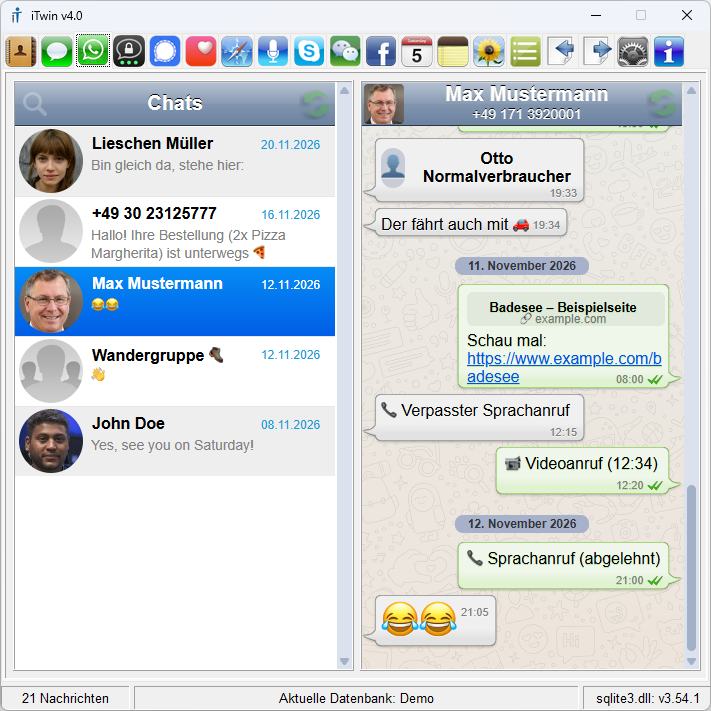
On the WhatsApp tab you see all chats and groups on the left and the conversation on the right, with pictures, voice messages, reactions and quotes – just like on the iPhone.
Step 4: save as PDF
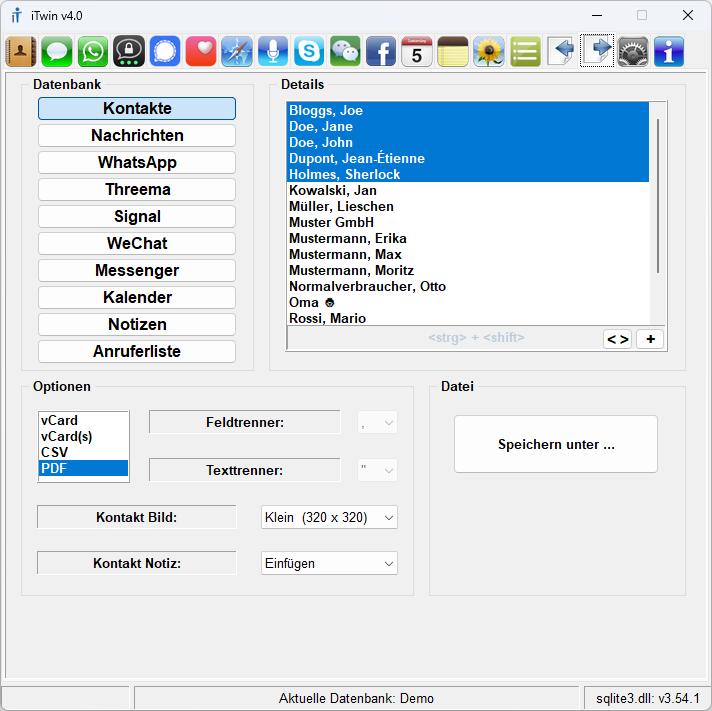
- Go to the Export page.
- Choose WhatsApp on the left.
- Under Details, select the chat you want – several with Ctrl or Shift.
- Choose PDF as the format and click “Save as …”.
Good to know
- Pictures or videos missing? Whether media are in the backup depends on the WhatsApp settings on the iPhone.
- The iPhone does not need to be connected. iTwin reads the backup, does not change it and sends nothing to the internet.
- Try it first: with the included demo data the export also works without a licence. For your own data it is unlocked in the full version.
- Please only export your own chats or chats whose participants agree.
The screenshots show the German interface; iTwin is available in 23 languages.