

Read iPhone Threema chats on your PC
Threema keeps your chats on the iPhone. If you want to read them on your PC, archive them or look something up after switching phones, iTwin opens them straight from the iPhone backup – with groups, pictures, polls and calls. Everything stays on your own computer.
What you need
- a Windows PC (Windows 10 or 11) with iTwin – free download
- a backup of your iPhone on the PC, made with iTunes or the “Apple Devices” app
Step 1: back up the iPhone on your PC
Create a backup with iTunes or “Apple Devices” – see Backing up your iPhone.
Step 2: import the backup into iTwin
Start iTwin, open the import page and click “Copy files” – see Importing a backup.
Step 3: open Threema
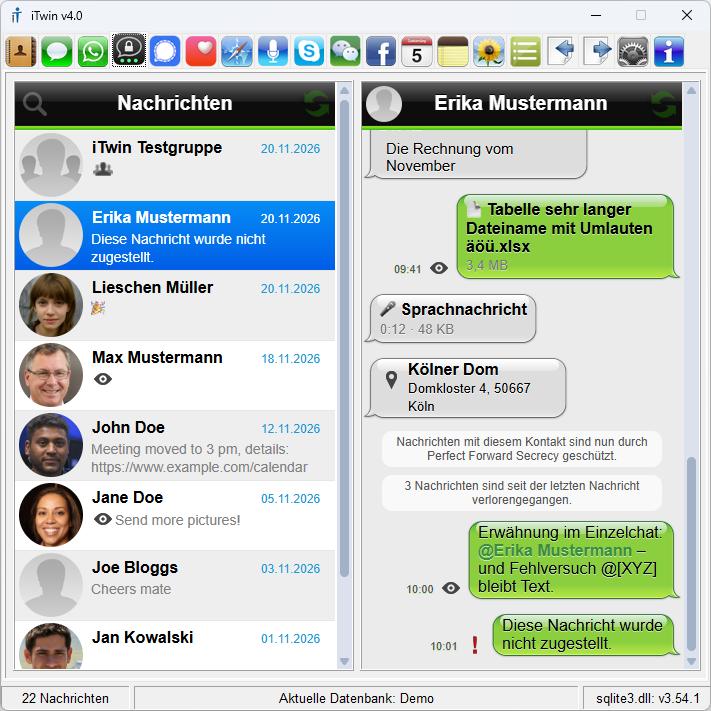
The Threema tab lists all chats and groups on the left and shows the conversation on the right, with pictures, polls and calls.
Step 4: save chats (optional)
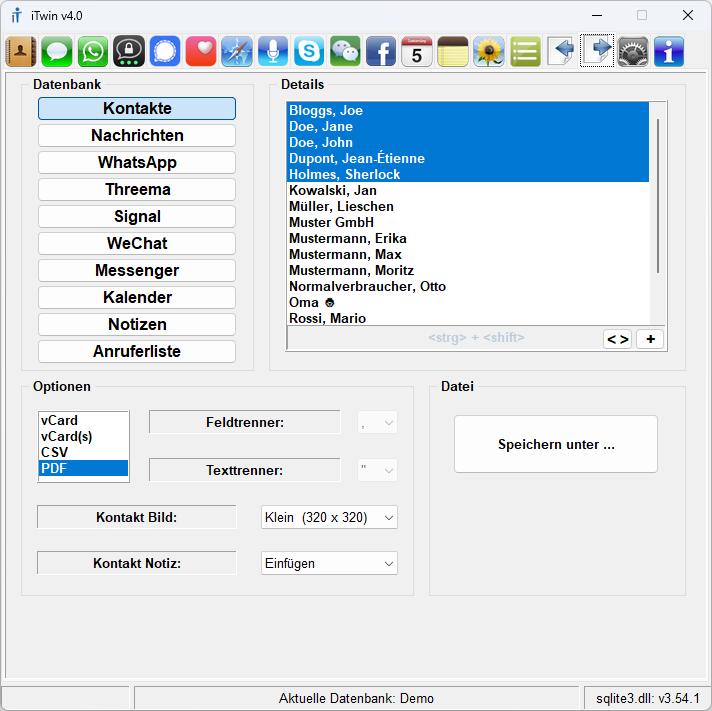
On the Export page choose Threema, select one or more chats under Details and save them as PDF, HTML or text.
Good to know
- The iPhone does not need to be connected. iTwin reads the backup, does not change it and sends nothing to the internet – just right for Threema.
- More than Threema: the same backup also contains WhatsApp, Signal, iMessage/SMS, Skype, WeChat and Facebook Messenger – iTwin shows them all side by side.
- Try it first: without a licence, 3 chats per messenger can be read and the demo data can be used in full. The full version unlocks all chats and the export.
The screenshots show the German interface; iTwin is available in 23 languages.