
Backing up your iPhone
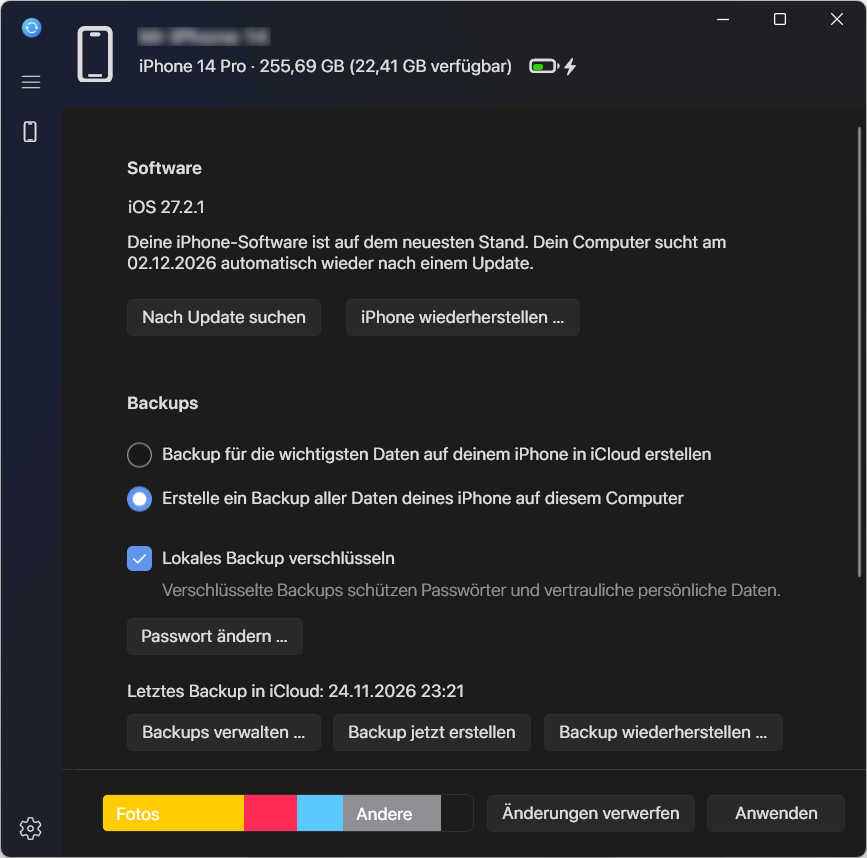
Create a backup of your iPhone on the PC with iTunes or the “Apple Devices” app (Microsoft Store).
Encrypted or not? Encrypted backups contain more, e.g. Health data and the call history. iTwin needs the backup password when importing them.
How to do it in “Apple Devices” (the options in iTunes are almost the same):
- Connect the iPhone to the PC with a cable and open the app.
- Under Backups, choose “Back up all of the data on your iPhone to this computer”.
- If you like, tick “Encrypt local backup” and set a password – keep it safe, the backup cannot be read without it.
- Click “Back Up Now” and wait until it has finished.